Multi-tenancy by construction, Part 9: Object storage isolation without cloud IAM
Tenant isolation for uploads on any S3-compatible backend: product services hold no storage credentials, one small signer service builds every key, and callers can only ever pass a relative path.
Row-Level Security covers the database. Uploads live somewhere else, and the usual advice for isolating them is cloud-specific: IAM session tags, per-tenant policies, STS-scoped credentials. That’s fine if you’re on one cloud forever. This platform has to run on any S3-compatible backend, from Ceph on-prem to a laptop running SeaweedFS, so isolation can’t depend on provider IAM.
The alternative is to make isolation a property of one small, well-tested service.
Product services hold no storage credentials
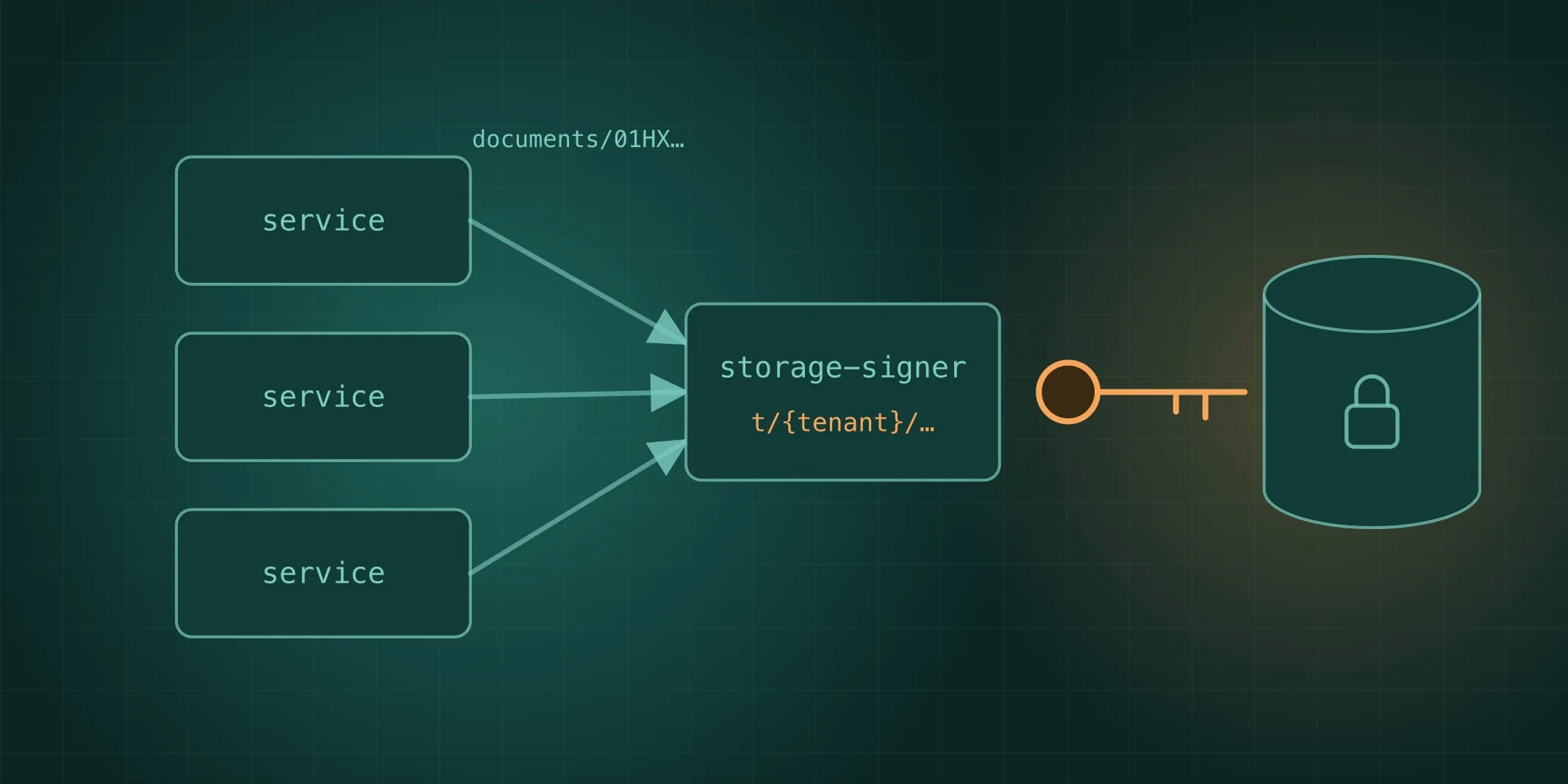
No product service has an S3 key. A lint rule bans importing the S3 SDK anywhere outside the one component that’s
allowed to: a storage-signer service, one per platform install. It holds the bucket credentials, and the bucket
policy, where the backend supports one, denies everything except those credentials.
Credential blast radius drops from “every service” to “one service with a very small API”.
Keys are built by the signer, never by the caller
Object keys follow one layout:
t/{tenant_id}/{area}/{ulid}A product service that wants to let a user upload a document calls the signer with a relative key, say
documents/01HX…. The signer:
- authenticates the caller as one of its own install’s product services, using the caller’s projected Kubernetes service-account token;
- takes the tenant from the request’s propagated context (
X-Tenant-Id, re-verified against membership), not from anything the caller passes; - prepends
t/{tenant_id}/itself and rejects anything that looks absolute or contains traversal; - returns a short-lived presigned PUT or GET URL with content-type and size limits;
- logs the signature with tenant, actor and request id.
There is no API through which a caller can name another tenant’s prefix. A bug in key-building code in a product service can produce a wrong relative path. It cannot produce a path outside the tenant, because the tenant segment isn’t the caller’s to write.
Downloads
For most objects, a presigned GET is fine. For sensitive ones, the signer can stream the download itself instead of handing out a URL, so every byte read is logged against a tenant, an actor and a request. Which mode applies is a per-area setting.
Public assets, such as a tenant’s logo, go in a separate public bucket under branding/{tenant_id}/. Nothing
private is ever in a bucket with public objects.
Offboarding
Because every object a tenant owns is under t/{tenant_id}/, deleting a tenant’s storage is deleting one prefix.
The signer exposes an admin endpoint for it, used by the offboarding job, and the deletion test afterwards checks
that no object version and no delete marker remains under the prefix.
What the tests check
- The signer rejects absolute keys and
..segments. - It never signs outside the caller’s tenant prefix, including when the caller’s context says tenant A and the request body mentions tenant B.
- Product pods can’t reach the bucket directly. The NetworkPolicy test tries, from a product pod, on the kind cluster in CI.
- Every signature produced a log line with the right tenant and request id.
The cost is one extra hop to get a URL. The data transfer itself still goes straight between the client and the bucket. For that, you get isolation that works identically on every backend, and one place to look when a customer asks who accessed a file.