Multi-tenancy by construction, Part 4: The tenant lives in the URL, not in your API
Where a request's tenant comes from: a path segment, resolved by the server and carried in context. Why no API operation should take a tenant argument, and the rate-limit trap in forwarding tenant ids.
The database now enforces isolation given a tenant in context. The next question is where that tenant comes from, and the answer shapes every API in the product.
The options people reach for
- An “active tenant” in browser storage. Breaks deep links, breaks two tabs open on two customers, and makes the tenant invisible in the URL bar and in logs.
- A tenant claim in the access token. Ties a session to one tenant, and means a role change isn’t visible until the token is reissued. Part 5 is about why tokens should identify the person only.
- A
tenantIdparameter on every operation. Spreads tenancy across every signature in the codebase, and every one of them is a place to pass the wrong id.
What we do instead
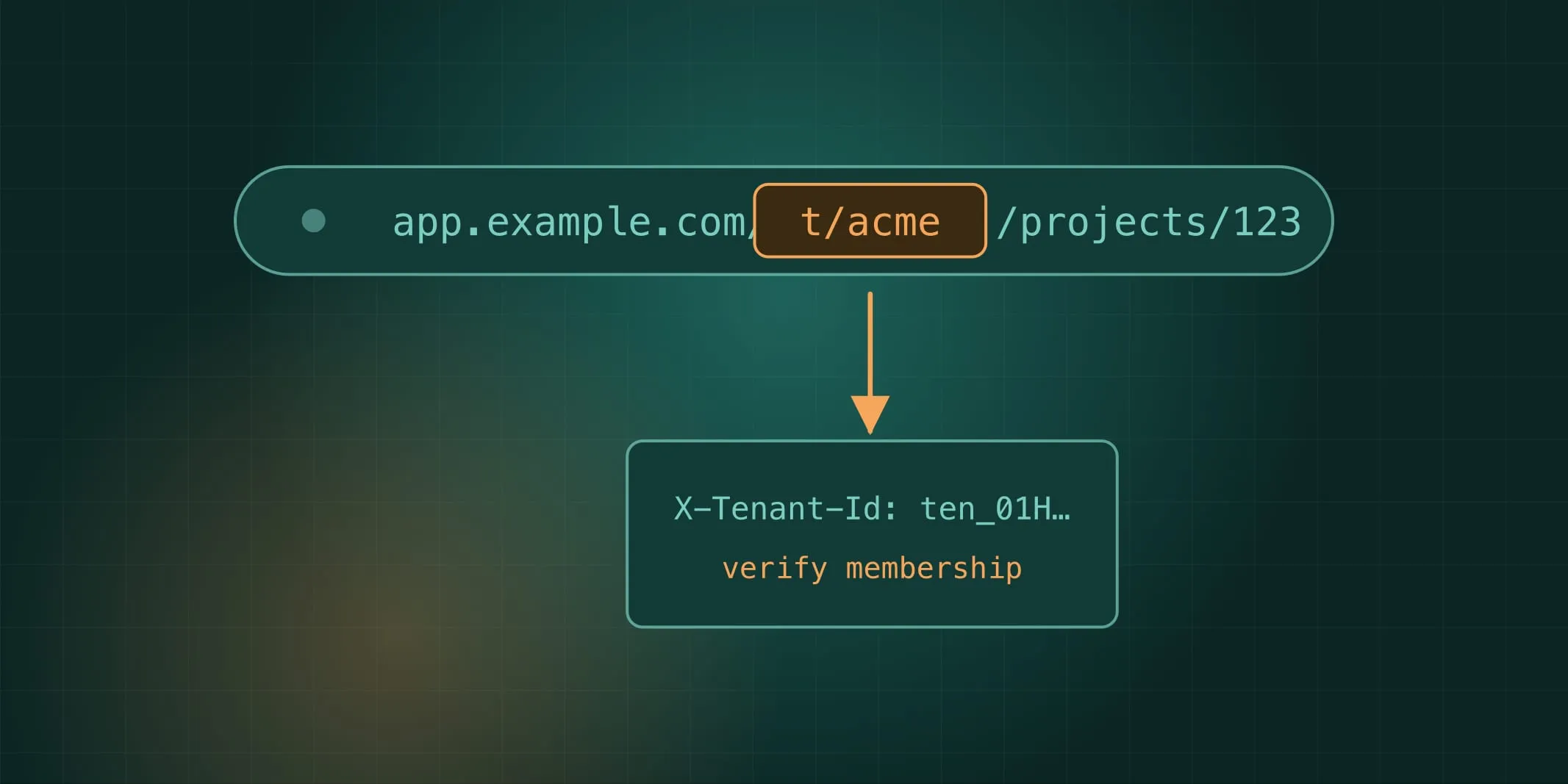
UI routes carry the tenant as a path segment: /t/{slug}/projects/123. A thin backend-for-frontend resolves the
slug to a tenant id and sets an X-Tenant-Id header on its calls to the APIs.
The APIs read the tenant from that header, verify the caller is a member, and put it in request context.
From there it flows into the database transaction, the log fields, the trace, and any job the request enqueues.
Handlers never see it as a parameter. They call tenantDb.tx(...) and the context does the rest.
The rule is simple enough to lint: no operation accepts a tenant argument. A route or schema with a parameter
called tenantId or tenant_id fails the build. The client expresses intent (which tenant they’d like), and the
server decides authority (whether they may).
There is no default tenant. A request with no tenant is “tenantless”, and only a handful of operations run that way:
who am I, which tenants am I in, accept this invitation. Everything else throws TENANT_REQUIRED.
Slugs are not ids
The slug in the URL is for people. It’s mutable, so a customer can rename acme to acme-corp without anything
breaking. The id is an opaque, server-generated ULID with a prefix like ten_01H…, and it’s what every table, cache
key and storage prefix uses. Slugs are never foreign keys.
The edge trust boundary
Two things about that header are easy to get wrong.
Strip it at the gateway. Anything arriving from the internet with an X-Tenant-Id already set has it removed.
Only the BFF sets it, from the route. Services verify membership anyway, so a forged header can’t grant access, but
stripping it keeps unverified ids out of rate-limit keys, logs and metrics.
Never rate-limit on a raw tenant id. It’s tempting to count requests per tenant at the edge. But if a non-member sends a thousand requests with a victim’s tenant id, they’ve just used up the victim’s quota. The gateway limits per client: per session, per API key, per source IP. The per-tenant plan quota is enforced after membership is verified, by the library, with counters keyed on a tenant the server has confirmed the caller belongs to.
What you get
- Deep links work, and two tabs on two tenants work.
- A tenant appears in the URL bar, in every log line and in every trace, so support can see at a glance which customer a request was for.
- Adding a new API operation can’t introduce a tenancy bug through its signature, because the signature has nowhere to put one.